Showing posts with label with. Show all posts
Showing posts with label with. Show all posts
Tuesday, October 1, 2013
Enhance Power Point Presentations with SlideShare
What is the best way to come up with an impressive PowerPoint presentation? Just pic up a bunch of slides and throw them one after the other. For those who think this is the right way, think again. The truth is that this is probably the best way to lise your client and your reputation as well. Even if you are not an expert in the process of creation a PowerPoint presentaition, you can take help of webbased applications like slide share to have a good enought result. Basically, SlideShare is a presentation sharing site, which has in recent times transmogrified into being the world’s largest Community for uploading of presentations and slideshows, here you can upload your presentation in the PowerPoint, PDF or Open Office formats. The maximum allowed file size is 100 MB. Just open the link www.slideshare.net and You get introduced to a world of top quality PowerPoint presentations. if you are planning to create a new presentation, then this could turn out to be adjust the right place for some inspiration. On the home page you will find a plethora of Small icons that serve as links to various presentations that falls in the most popular category. If there is something Specific that you are looking for, then you can browse through the various categories listed here. All the popular Categories like health, finance, business, templates, gadgets, automotive, education, etc. are taken care of; so, it is quite likely that if you look carefully, you will be able to find the kind of presentation that you are looking for.

Once your presentation is ready, you can have it uploaded on SlideShare and share i with just about anyone, anywhere in the world. The process of uploading is really simple. Just sign up on the website by creating a username and password. You are also required to provide your e-mail address. After that you will be taken to the page where you can start uploading you files by clicking on the upload link. During the upload process, the blue progress bar will appear to keep you informed that the uploading process is going on in the background. The time taken for the process to be completed will depend on the file size and also on hwo fast your internet connection is. Nevertheless, don’t expect things to happen in a jiffy; you have to be patient.
SlideShare also gives you the option to decide who gets to see your presentation. The privacy icon is by default set ‘everyone’ and what means anyone who logs on the website can see it. But you can change the default option to ensure that it is only your contacts that are able to see the presentation. Another great thing about SlidShare is that is can be used to embed a slide show into you blog. When you are watching a slide show on the website, at the right hand side of the slideshow player, you will find a text box called ‘Embed onto your blog’. This text box has few lines of code in it. Just copy the code and paste it on your blog. The slide show will start appearing there instantly.
.
Read more »
Once your presentation is ready, you can have it uploaded on SlideShare and share i with just about anyone, anywhere in the world. The process of uploading is really simple. Just sign up on the website by creating a username and password. You are also required to provide your e-mail address. After that you will be taken to the page where you can start uploading you files by clicking on the upload link. During the upload process, the blue progress bar will appear to keep you informed that the uploading process is going on in the background. The time taken for the process to be completed will depend on the file size and also on hwo fast your internet connection is. Nevertheless, don’t expect things to happen in a jiffy; you have to be patient.
SlideShare also gives you the option to decide who gets to see your presentation. The privacy icon is by default set ‘everyone’ and what means anyone who logs on the website can see it. But you can change the default option to ensure that it is only your contacts that are able to see the presentation. Another great thing about SlidShare is that is can be used to embed a slide show into you blog. When you are watching a slide show on the website, at the right hand side of the slideshow player, you will find a text box called ‘Embed onto your blog’. This text box has few lines of code in it. Just copy the code and paste it on your blog. The slide show will start appearing there instantly.
.

Thursday, September 26, 2013
Yahoo Messenger 2 0 for iPhone App Store comes with 3G video calls

Now iPhone users to stay connected with their friends using the 3G video calls from your iPhone to a Mac or PC, or vice versa latest Yahoo Messenger 2.0 released app for the iPhone. With Yahoo Messenger 2.0, turns your iPhone to make free video calls to friends Messenger, Cheap international calls to landlines or mobile phones, video calls and the latest features such as multitasking, instant messages and free SMS. The new update of Yahoo Messenger can be downloaded for free.
Yahoo! released the latest Yahoo Messenger 2.0 for iPhone earlier than Apple. Yahoo Messenger for the iPhone has grown up as their version 2.0. This new version now offers video with the voice call the user directly to the iPhone almost all of Yahoo Messenger as universally iPhone iPhone 4 for 4 video calls, iPhone 4 for PC / Mac and vice versa what keeps you in touch verbally. On 3G networks, it supports video calls and voice, one that goes on Apple FaceTime function.
Unfortunately, video calls like this buggy, and in particular it is a department of rather low quality. In addition, the recently updated Yahoo Messenger supports multi-tasking behind the iPhone 3G and iPhone 4 devices running IOS 4.1.
With Yahoo Messenger 2.0 for iPhone, users can get:
* Video calls: With Yahoo Messenger, you can make video calls and stream live video chat.
* Voice calls: You are also able to make free voice calls to your Yahoo Messenger friends.
* Low cost voice calls: You will get low cost international, so talk with your friends on their landline or mobile phone.
* Multitasking: Work with other iPhone apps while Yahoo! Messenger runs in the background†
* Send free SMS messages via Yahoo! Messenger
* From iPhone to desktop and more: Connect with your IM friends in any way you want—mobile app to PC, mobile app to mobile app
* Get notified for every message: Know when a new message comes whether the app is running, in the background, or even if it is not open
* Show and tell: Capture and share iPhone photos and video in real-time, with your Yahoo! Messenger buddies
* Bring your friends in one place: Add your Windows Live Messenger contacts to your buddy list
* Be creative: Use rich text and personal expressions, like emoticons and avatars, to update your friends
* Enhanced performance: Get a simpler, faster, richer Yahoo! Messenger experience at your fingertips
Wednesday, September 18, 2013
Analyse and improve you writing with PaperRater
Before we get down to using PaperRater, we will tell you more about the magic that this tool can help you weave. Well, it is nothing short of magic, especially if grammar and error-free writing are not your forte, and drafting college papers or professional documents give you nightmares. PaperRater is a plagiarism detection and proofreading tool that checks your write up for grammatical errors and offers suggestions to improve the style, word choice and readability of your document.
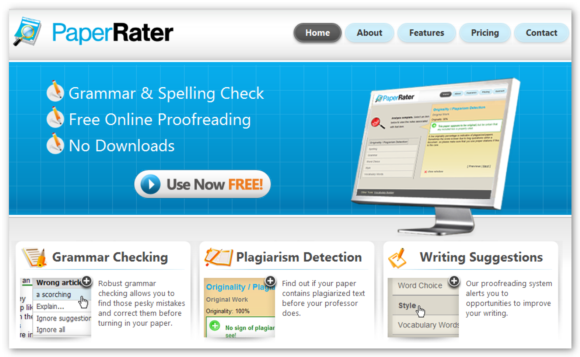
For instance, you are a budding publisher and a young writer approaches you with a manuscript that he/she wants to print. But before taking the plunge, you would definitely like to ensure that the script is original and will not land you in copyright issues. Enter PaperRater, a free tool that scans the documents for any potential plagiarism, although those who have used it extensively will tell you that language and grammar checking happens to be its strong point.
PaperRater has been developed by a bunch of college grads and linguistics professionals. Used by universities and schools in more than 46 countries, this tool has helped several students improve their writing style. But before the developers could introduce PaperRater on the Internet, they had to overcome huge challenges connected with computational linguistic design and development, entity resolution and automatic entity extraction, clustering, prioritization, plagiarism detection, duplicate document recognition, name parsing and regularization, among others.
That definitely is a long list of tasks to be accomplished within a short time. Therefore, a team of subject matter experts and computational linguistics worked together and created a core Natural Language Processing (NLP) engine to extract language evidence from term papers and essays, and then translate these into accurate codes, the creators of PaperRater have also included the ‘Vocabulary Builder’ tool to help students improve their vocabulary.
PaperRater comes loaded with an exciting range of features that make this application a favorite among all. When you submit a paper, the tool will analyse it pronto, 24/7and I real time. You will get in depth analysis that will help improve writing skills, grammar power and word choice thus enhancing the document’s overall readability. You will also find additional comments and analyses to clean up the paper adequately. Here is a step by step to get you initiated.
Open the document that you want to analyse. Just copy and paste the text (including the works cited if it is a research paper) into the text box. You will also see a notification which states that the tool is created to evaluate high school level writing and above.
Now, choose the kind of paper that you want to evaluate. If it is a write up for the World Wide Web, you may like to use the essay analysis feature. You can also choose from several options that cover almost any type of writing.
Click on the ‘Get Report’ tab.
The tool will immediately check the paper for grammar, vocabulary, word choice, style and plagiarism. Each category is underlined with a different colour and this makes editing extremely easy. Phrases, words and grammatical issues are underlined in green. When you click on the underlined words, options will be there to help you fix the problem.
Similar options are available for spelling and word choice. While spelling issues are available for spelling and word choice. While spelling issues are underlined in red, word choice problems are highlighted in blue. Plus, the problems pointed out in the document will be clarified, so that one can learn more.
Writing style is also analysed by PaperRater, although it is not underlined like other spelling and grammar suggestions. Do remember that the use of passive voice is highly condemned in the literary world. paperRater acknowledges this fact and makes suggestions to fix this error.
Another interesting feature of PaperRater is the vocabulary rating. If one has used interesting words in the document, the toll is generous enough to shower words of praise.
Finally, the tool will analyse your document for plagiarism. However, those who have used this feature feel that this is not as thorough as some of the other plagiarism detection tools available online. You can try it or tally it with other apps. Ideally, you can get the paper checked at Paper Rater and then try another plagiarism detection tool for through result.
And before we sign off, here is more. A look at the PaperRater website will give you a lot more information on the additional features that the developers are planning to offer in the near future. Some of these features include grammar and writing tutorials, webinars, a method to create online personal database and a way to search through online databases automatically. In other words, PaperRater will not only help you work upon writing and language skills, but also enable you take it to another level.
Subscribe to:
Posts (Atom)